WhatsApp AI Reply & Chatbot
Help customers get answers around the clock. Configure AI Reply with your business knowledge, test the questions your Philippine customers ask, and hand over to your team when needed.
Helpful Answers from Your Business Knowledge
AI Reply uses your FAQs and reference content to answer routine enquiries. Organise information by topic, keep it up to date, and test replies before enabling the assistant for customers.
- Test free-text questions in the languages your customers use
- Knowledge bases for your FAQs, products, prices and policies
- Customers can ask for a person; AI pauses while your team replies
- Set greetings, fallback messages and working hours in the portal
- Review replies and unanswered questions in the AI Reply Log
- Connect booking, order lookup and lead capture through configured journeys and APIs
Build AI Replies for Everyday Enquiries
Start with FAQ answers, then connect your systems for order status, bookings and reminders. Each use case depends on your configured content, journey and integrations.
Order Tracking
Share a tracking link from your knowledge base; live status needs a journey connected to your order system.
Appointment Booking
Share a booking link, or connect a custom journey to your booking system for in-chat scheduling.
FAQ Handling
Answer common questions using the FAQs you add to your knowledge bases.
Lead Qualification
Collect name, email, budget, and requirements before routing to your sales team.
Payment Reminders
Use approved WhatsApp templates and a configured journey for proactive reminders.
Post-Purchase Support
Answer return and warranty policy questions; connect a journey for case-specific actions.
Appointment Reminders
Connect approved templates and your scheduling system to send reminders and collect confirmations.
Survey & Feedback
Ask for feedback through an interactive message or configured journey.
Product Recommendations
Answer product questions from your knowledge base; personalisation needs connected customer data.
Configure, Test & Review AI Reply
Prepare your business information first, then use the portal guides to set up and check the assistant.
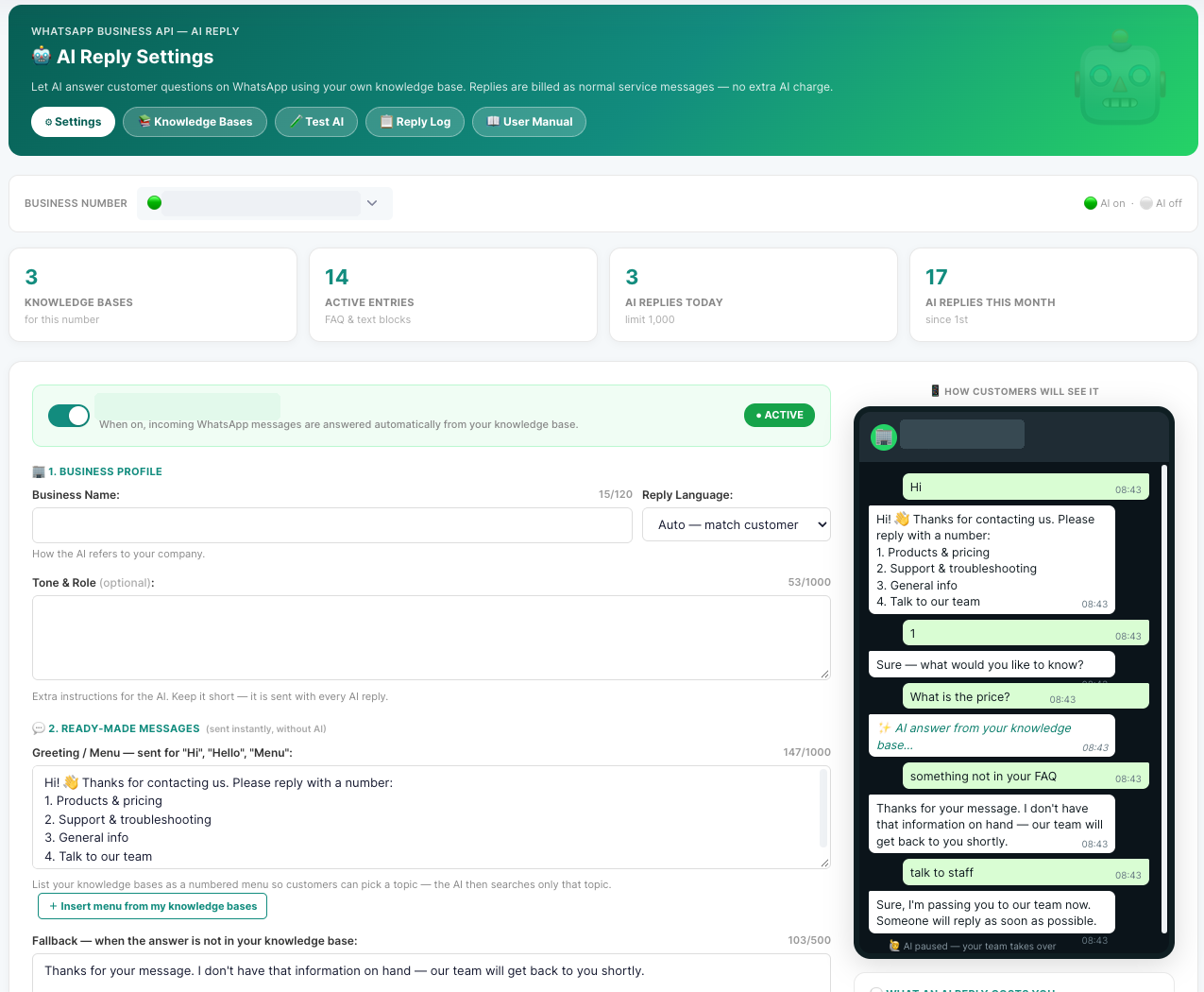
1. AI Reply Settings
Configure the assistant for your WhatsApp business number.
2. Knowledge Bases
Add topic-based FAQs and reference information for your business.
3. Test Your Replies
Try customer questions and refine the information behind each answer.
A Clear Path from Question to Answer
Answers from your information
Add FAQs, prices and policies by topic. If an answer is missing, the assistant uses your fallback message instead of guessing.
Handoff to your team
Customers can ask for an agent. Your team continues in the Conversation inbox, and AI pauses while staff reply.
Greeting, menu & hours
Choose a greeting, topic menu, fallback and handoff messages. Set working hours if you do not want AI running all day.
Test and improve
Try customer questions before switching on. Review the reply log and questions AI could not answer, then improve your knowledge bases.
Return to the menu
Customers can type MENU to return to the available topics after an answer or handoff.
Pricing
There is no extra AI fee. Outbound AI replies are charged as WhatsApp service messages at your normal rate. Ask our team for current Philippine peso charges.
Set Up AI Reply for Your Business
Our team can help you prepare your knowledge bases, configure replies and connect the customer journeys you need.